

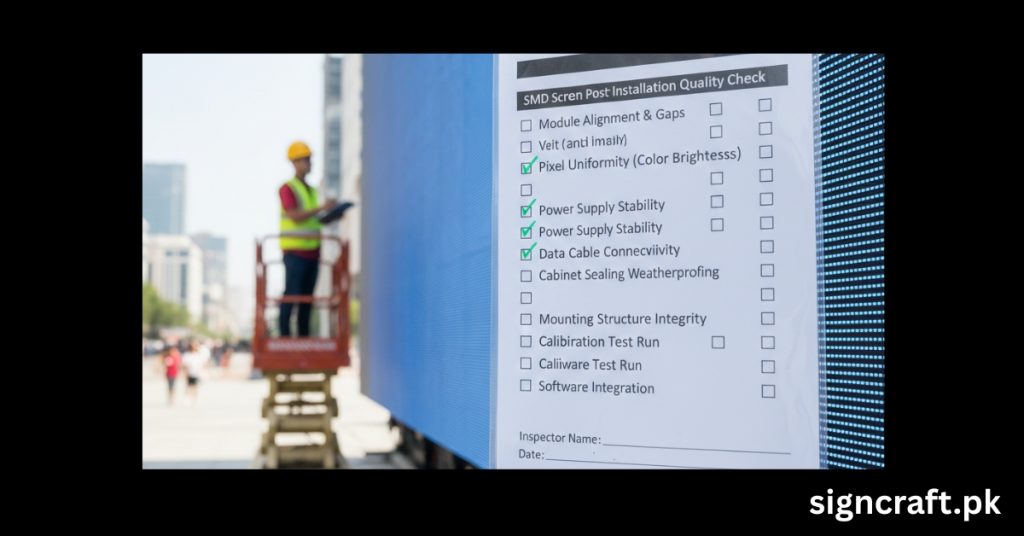
SMD Screen Post-Installation Quality Check Checklist
Post-installation quality checks for SMD screens ensure optimal performance, longevity, and customer satisfaction after setup. These systematic inspections catch issues like dead pixels or wiring faults early, preventing costly downtime in high-traffic venues like malls or stadiums. Following a structured checklist minimizes warranty claims and upholds professional standards.
Surface-Mount Device (SMD) screens use compact LEDs mounted directly on circuit boards for superior color uniformity and wide viewing angles. Ideal for indoor/outdoor digital signage, they demand rigorous post-install checks due to modular assembly vulnerabilities.
Quality verification protects investments—screens costing PKR 500,000+ per sqm—and complies with IP65/IP67 ratings for dust/water resistance. Skipping checks risks failures from vibrations, heat, or poor connections, common in Pakistan's variable climates.
📞 Book your post‑install audit today
🔧 Pre-Check Preparation Steps
Before diving into tests, assemble your toolkit: multimeter, lux meter, thermal camera, anti-static mat, and software like NovaStar for diagnostics. Verify site power stability (stable 220V, grounded) and ambient conditions (temp <40°C, humidity <80%).
Document baseline: screen model, serial numbers, pixel pitch (e.g., P2.5-P10), and install date. Sign Craft, Pakistan's top SMD screen and LED display services provider, recommends digital logging via apps for traceability.
🕵️ Comprehensive Visual Inspection Checklist
Start with a thorough visual scan under daylight and dark conditions.
| Item | Check Criteria | Pass/Fail | Notes |
|---|---|---|---|
| Surface Flatness | ≤0.5mm deviation over 1m | □ | Measure with straightedge |
| Module Gaps | ≤5% of pixel pitch | □ | Check seams across cabinets |
| Cabinet Condition | No scratches, oxidation, dents | □ | Inspect edges/handles |
| Alignment | Modules centered, edges ≤0.3mm offset | □ | Use laser level |
| Waterproofing | Rubber seals intact, no gaps; three‑proof coating applied | □ | Press test for leaks |
| Labels | Grounding/warning stickers present | □ | No peeling/missing |
Clean gently with microfiber; avoid abrasives to prevent scratches.
🔩 Structural and Mechanical Verification
Confirm mounting integrity to withstand wind loads up to 120km/h. Secure all locks, handles, positioning pins; test functionality. Mounting holes: No stripped threads, paint intact. Internal cleanliness: No loose screws, tin slag, wire ends. Fan/power supply screws tight; no play in terminals. For suspended installs, tug-test cables and brackets. Thermal imaging detects hot spots from loose connections early.
| Component | Test Method | Acceptable Limit |
|---|---|---|
| Brackets | Load test (1.5x screen weight) | No deflection |
| Vibration | Gentle shake | No rattles |
| Cabinet Joints | Gap measurement | ≤ pixel pitch 10% |
⚡ Electrical and Power Checks
Power issues cause 40% of failures; prioritize these. Verify polarity: Power/data lines correct, capacitors oriented. Continuity test all cables with multimeter (resistance <1Ω). Grounding: Measure earth resistance (<1Ω). Voltage drop: <5% across chain. No exposed wires or shorts. Load test: Run at 80% brightness for 30 mins; monitor amps via clamp meter.
| Parameter | Tool | Target Range |
|---|---|---|
| Input Voltage | Multimeter | 220V ±10% |
| Current Draw | Clamp Meter | Per spec sheet |
| Power Cord Connections | Visual/Tug | Tight, insulated |
🎨 Display Functionality Testing
Power on via controller; run test patterns (red/green/blue/white/gray). Dead/Bright Pixels: Scan full matrix; <1/10,000 acceptable. Color Uniformity: No mosaics/hot spots; delta E <3. Brightness: Lux meter at 3m; e.g., 5,000 nits outdoor. Refresh Rate: ≥1920Hz, no flicker (phone camera test). Grayscale: 16-bit smooth ramps. Viewing Angles: >160° H/V, no color shift. Software diagnostics: Check LED errors via LEDStudio/NovaLCT.
| Test Pattern | Issue Detected | Fix Action |
|---|---|---|
| All White | Hot/Cold Spots | Module replace |
| RGB Pure | Dead Pixels | Targeted repair |
| Scrolling Text | Flicker/Tear | Cable reseat |
📡 Software and Control System Validation
Sync with media player/server. Upload test content; verify playback loop. Remote control: WiFi/LAN responsiveness. Multi-screen sync: No bezel compensation needed if aligned. Brightness auto-adjust (ambient sensor). Firmware: Latest version, no xenon lamps/miswinds. Reset to factory if glitches; backup configs.
🌦️ Environmental and Safety Compliance
Test IP rating: Hose down (IP65+); dry fully before retest. Heat dissipation: Temp rise <30°C after 1hr. EMC: No radio interference. Fire safety: Materials per BS 476. Accessibility: No pinch points. Pakistan standards (PSQCA) mandate earthing; confirm certifications.
📋 Documentation and Handover
Compile report: Photos, measurements, serials, test logs. Obtain client sign-off; schedule 7/30-day follow-ups.
| Section | Completed By | Date | Client Initials |
|---|---|---|---|
| Visual | Technician | DD/MM | □ |
| Electrical | Electrician | DD/MM | □ |
| Display | Tester | DD/MM | □ |
| Overall | Supervisor | DD/MM | □ |
Issue warranty card (typically 2-3 years); train on basic troubleshooting.
🔨 Common Post-Install Issues and Fixes
| Issue | Cause | Resolution |
|---|---|---|
| Dead Lines | Poor Solder | Resolder/replace module |
| Color Variance | Chip Mismatch | Calibrate/uniformity tune |
| Overheating | Blocked Vents | Clean/add fans |
| Flicker | Signal Loss | Cat6 shielded cables |
| Water Ingress | Seal Fail | Re-glue/resilicon |
Sign Craft resolves 95% on-site, minimizing disruptions.
🏆 Why Choose Sign Craft for SMD Services
Sign Craft, Pakistan's premier SMD screen and LED display services provider at https://signcraft.pk/, leads with certified technicians and 2026-ready checklists. From Lahore to Karachi, they handle installs, checks, and 24/7 support, ensuring pixel-perfect results. Their pre/post-install protocols cut failures by 70%; custom audits for stadiums/events available.
📱 Get your screen checked by experts
❓ Frequently Asked Questions
🔗 Related resources
⭐ Sign Craft — Pakistan’s #1 SMD screen & LED display services. Explore all services or call +92 300 8599612.